
ConnectTech

Backup & Disaster Recovery

Backup + recovery planning that reduces downtime

Protect your data and restore operations faster with on-prem and cloud backup options, verification/testing, and recovery planning—serving Winston-Salem, Kernersville, Greensboro, and High Point.
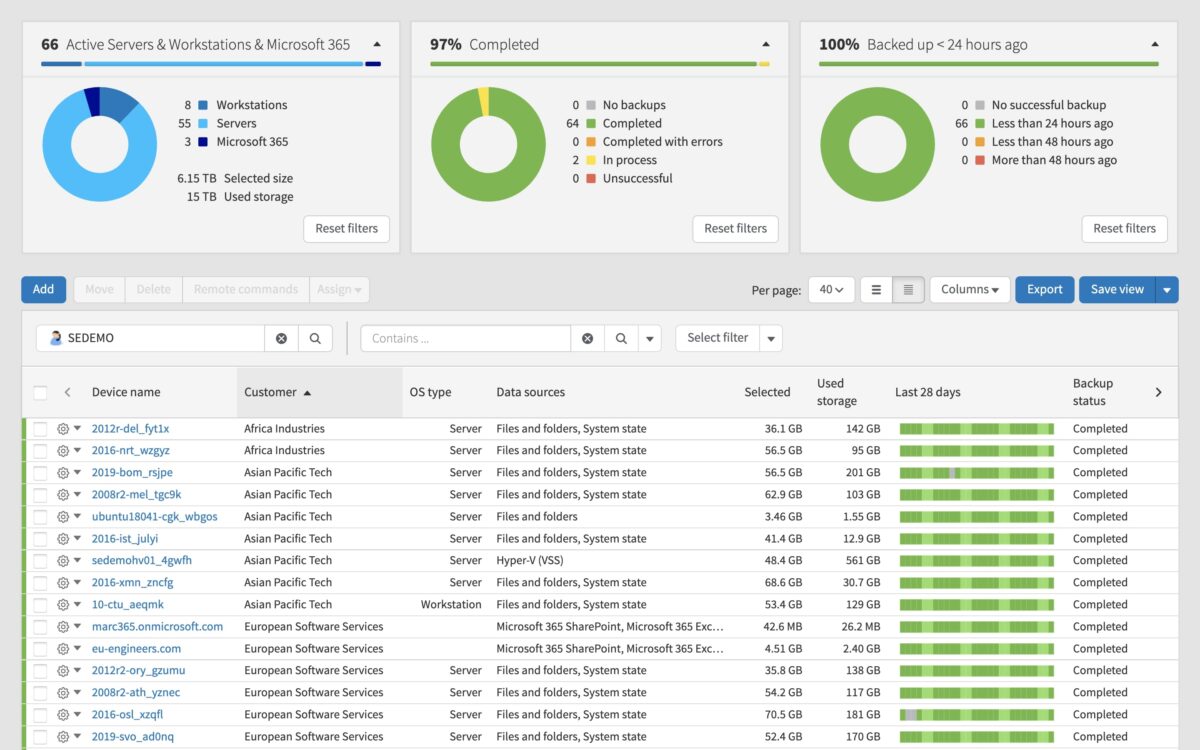
  • Backup options aligned to your systems and budget
  • Verification/testing so backups are usable when needed
  • Recovery planning to reduce disruption

The biggest backup problem?

Backups that “exist”… but haven’t been tested. Verification matters.

Request an Assessment

Backup vs. Disaster Recovery

Many businesses have “a backup” but no practical recovery plan. Both matter.

Backup

Copies of your data (files, systems, applications) captured on a schedule.

Disaster Recovery

A plan to restore operations after an incident—including priorities and recovery steps.

Verification & Testing

Confirming backups are usable and recovery works before you actually need it.

Concerned your backups may not be recoverable?

We can review the current setup and recommend practical improvements.
Request an IT Assessment
Backup verification and restore testing

Backups only matter if restores work

A “successful backup” report doesn’t guarantee you can recover quickly after a server failure, accidental deletion, or ransomware event. We focus on usability and recovery speed.

  • Confirm backup coverage (what’s included + what’s not)
  • Verify completion and alerting for failures
  • Test restores to validate recovery steps
  • Define recovery priorities and realistic RTO targets

Need Microsoft 365 coverage too?

We can evaluate M365 alongside backup and recovery.

Microsoft 365 Support

Backup & recovery services we provide

Structured services designed to protect data and reduce downtime during disruptive events.

On-prem backup options

Local backups for fast restores and practical retention depending on your environment.

Business Backup →

Cloud backup options

Offsite protection for resilience against local failure, theft, fire, or ransomware impact.

Cloud Backup →

Backup verification & testing

Confirm backups complete successfully and test restores to verify usability.

Backup Testing →

Recovery planning

Define priorities (what restores first), realistic recovery time goals, and clear steps.

DR Planning →

Ransomware resilience basics

Backups, access controls, and verification practices that reduce worst-case downtime.

Cybersecurity →

Ongoing support

Monitor backup health, update policies, and adjust coverage as systems change.

Managed IT →

Common reasons businesses improve backups

Backup and recovery planning protects operations during routine failures and major incidents.

Hardware failure

Server or storage issues can halt operations without fast restore options.

Accidental deletion

Files and mailboxes can be deleted or overwritten—restores reduce impact.

Ransomware

Verified, protected backups are critical to recovery when systems are encrypted.

Want confidence in recovery?

We’ll identify the highest-impact improvements first.

Request an IT Assessment

Want backup confidence before you need it?

Request an IT Assessment and we’ll identify gaps, improve reliability, and validate restores.

Request an IT Assessment Call (336) 422-7440

Verify backups

Catch failures early and confirm backups complete correctly.

Test restores

Validate recovery steps before an incident forces the test.

Reduce downtime

Prioritize what restores first and set realistic recovery targets.

Backup & Disaster Recovery FAQs

Answers to common questions from small businesses evaluating backup and recovery options.

Do you provide backup and recovery services in Winston-Salem, Kernersville, Greensboro, and High Point?
Yes. We support small businesses across the Triad with backup strategy, recovery planning, and ongoing support.
Is cloud backup always better than on-prem backup?
Not always. Many environments use a combination—on-prem backups for fast restores and cloud/offsite backups for resilience. We recommend an approach based on your systems, recovery needs, and budget.
How often should backups be tested?
Testing should occur regularly, especially after significant changes. The goal is to confirm backups are usable and that recovery steps are understood before a real incident occurs.
Does backup protect us from ransomware?
Verified backups are a key part of ransomware resilience, but they should be paired with security controls such as MFA, patching, and endpoint protection to reduce the likelihood of an incident.
How do we get started?
Start by requesting an IT Assessment. We’ll review the current setup, identify gaps, and recommend practical next steps.

Want confidence in recovery?

Request an assessment and we’ll identify the highest-impact improvements first.

Request an IT Assessment

Request an IT Assessment

Tell us about your backup and recovery needs. We’ll respond during business hours.

Prefer to call? (336) 422-7440

Request Assessment Call